The tools I needed didn't exist. So I built them. The entire digital infrastructure supporting a week-long school trip — a native iOS staff app, a GPS boundary system, a real-time scavenger hunt platform — was designed and built not by a software development team, but by me, their teacher, working in partnership with an artificial intelligence.
In March 2026, thirty-five Year 9 students stepped off a plane and into the streets of Melbourne. They came from a regional coastal community on the Sunshine Coast, where life moves at a different pace, where you know your neighbours, and where navigating the world mostly means driving familiar roads between familiar places. Melbourne was something else entirely. A sprawling, fast-moving, culturally rich city of five million people. For many of these students, it was the biggest, busiest, most diverse place they had ever been asked to navigate on their own.
The camp was designed to stretch them. To push them into unfamiliar territory, literally and figuratively. To help them explore culture, diversity, and the functioning of a major city. To give them opportunities to work as a team, make decisions, engage with strangers, and discover that they are more capable than they thought.
What the students didn't know was that the entire digital infrastructure supporting their experience had been designed and built not by a software development team, but by me, their teacher, working in partnership with an artificial intelligence. This paper describes what I built, how I built it, and why it matters that the person who understood the learning goals most deeply was the one building the tool.
Companion Documents
How It Works
Walks through every workflow, screenshot, and real-time build from the trip — including twelve features conceived and shipped to production in a single day.
Technical Deployment Guide
For IT teams: a detailed architecture overview covering Microsoft Entra ID integration, API security design, reverse proxy configuration, and the case for purpose-built systems.
Complete Edition (PDF)
Download all three documents as a single, professionally formatted PDF — ideal for printing or offline reading.
"The role of the teacher is to create the conditions for invention rather than provide ready-made knowledge." — Seymour Papert
Papert wrote those words about children and computers. But they apply with equal force to what happened here: an educator creating the conditions for an experience that no off-the-shelf product could provide.
The Dilemma
Every educator who has taken students into the world beyond the classroom knows the tension. On one side sits the learning experience: the growth that happens when young people encounter the unfamiliar, take risks, and discover new things about themselves and the world. On the other side sits the weight of responsibility: safety, logistics, duty of care, risk management, the knowledge that thirty-five families have entrusted you with their children in a city far from home.
This tension is not new, but it is intensifying. In an increasingly complex world, the risks that educators must manage have grown more numerous and more visible. Allergies, medical conditions, safeguarding protocols, emergency communications, real-time location awareness. Each new layer of risk management is entirely justified, but the cumulative effect can be paralysing. The dilemma is that the very systems designed to keep students safe can, if poorly implemented, constrain the experience to the point where the learning disappears.
"While those of us in schools may wish to blame others for imposing constraints, many of our constraints are self imposed. Are we able to escape from these and respond to what we believe is best for our students?" — David Loader, The Inner Principal
The question Loader poses is the right one. The answer, in this case, was to build software that didn't force a choice between safety and experience. Software that put critical information at staff fingertips so they could manage risk confidently and still give students the freedom to explore. Software designed by someone who understood both sides of the dilemma because he lived it every day.
What We Built
The suite of applications I built for the Melbourne trip comprised two integrated platforms, each designed to solve a specific dimension of the challenge. Together, they formed a comprehensive digital ecosystem for a complex, week-long learning experience.
Melbourne Connections: The Staff Companion
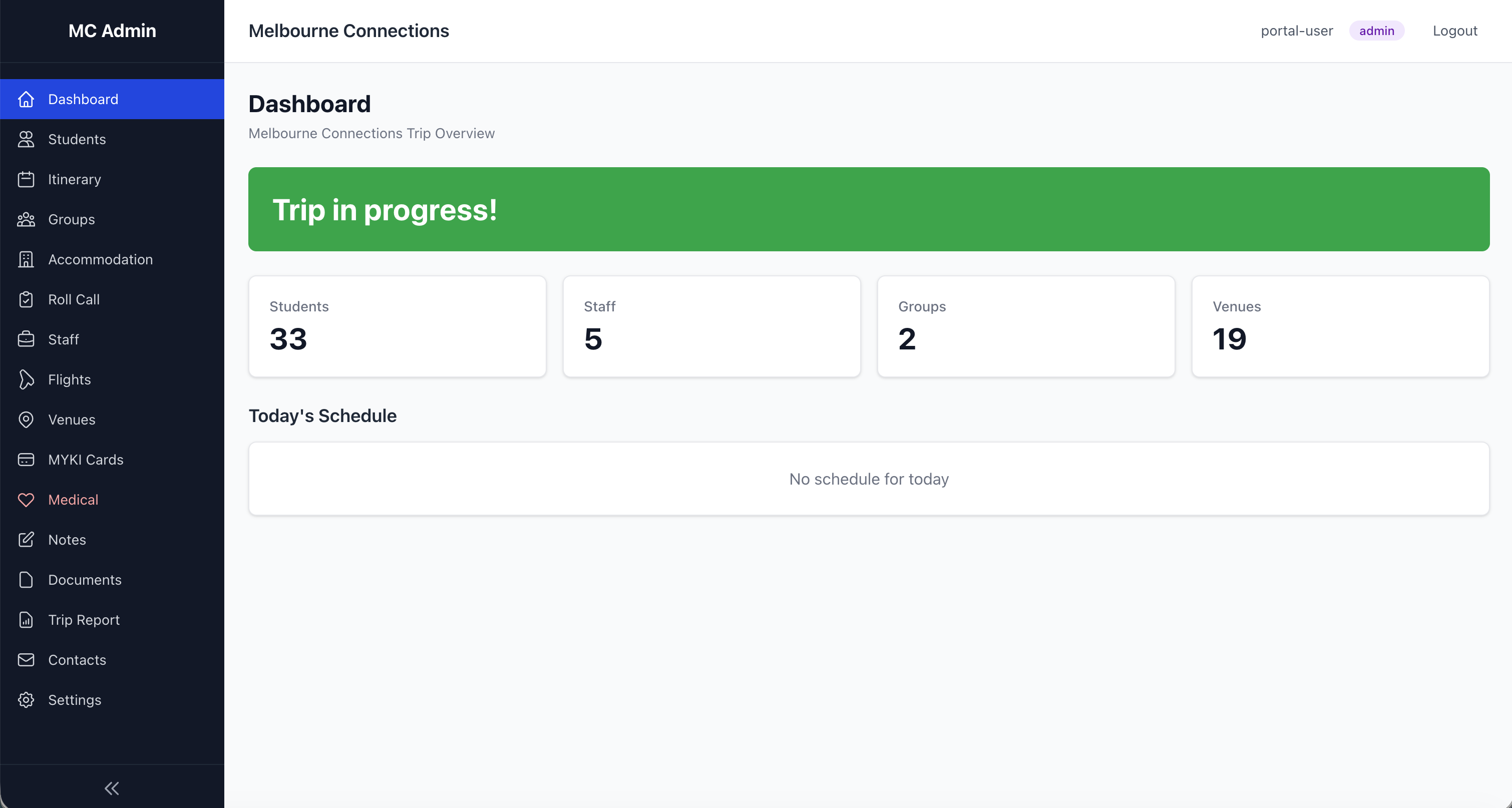
Melbourne Connections is a native iOS application I built in Xcode with the help of Claude Code, installed on each staff member's iPhone. It provides offline-capable access to every piece of information a supervisor might need at any moment of a six-day trip.
The complete itinerary lives in the app. Fifty activities across six days, with flight details, coach transfers, venue information, and timing. The app detects the current and next activity automatically, so a staff member glancing at their phone at any moment knows exactly where they should be and what's coming next.
Roll call management tracks attendance by group, with check-all buttons for efficiency, notes fields for recording absences or issues, and automatic history logging with timestamps. Staff can email roll call summaries directly from the app, creating a documentary record without paperwork.
The student directory holds every student's details: group allocation, room assignment, roommate information, and critically, dietary and medical data. When a staff member walks into a restaurant with eighteen students, they can tap their phone and show the chef exactly which students have allergies or dietary requirements. No printed lists to lose. No trying to remember who is gluten-free. The information is there, instantly, at the moment it matters.
Emergency contacts are accessible with a single tap. Staff contacts have direct call and SMS buttons. If something goes wrong, the path from "I need to contact someone" to "I'm speaking to them" is measured in seconds, not minutes of scrolling through phone contacts or searching through paperwork.
Location information for all nineteen venues is integrated with GPS mapping, so staff can navigate to any destination without switching apps. The entire system works offline, because mobile signal in the Melbourne Metro or inside large venues is unreliable, and the moment you most need critical information is often the moment your internet connection is weakest.
Critically, the sensitive medical and personal information powering the app was not manually typed from spreadsheets. Our school's core systems already hold dietary requirements, medical information, and emergency contacts in structured databases with APIs available for integration. The AI helped me connect to these existing systems securely, ingesting the data in encrypted form and transforming it into the formats the app needed. This is a key enabler. Schools already maintain this sensitive data. When an educator can leverage those existing APIs with the help of an AI development partner, the data flows securely from the authoritative source into the purpose-built tool without re-entry, without transcription errors, and without the stale-data problem that plagues printed lists — not to mention the significant security risk of staff carrying printed booklets of student and parent PII throughout a trip. I have been on a trip where a staff member left the camp booklet in a café. In a data-privacy-aware society, this is a complex problem, and one that purpose-built, authenticated digital tools solve comprehensively.
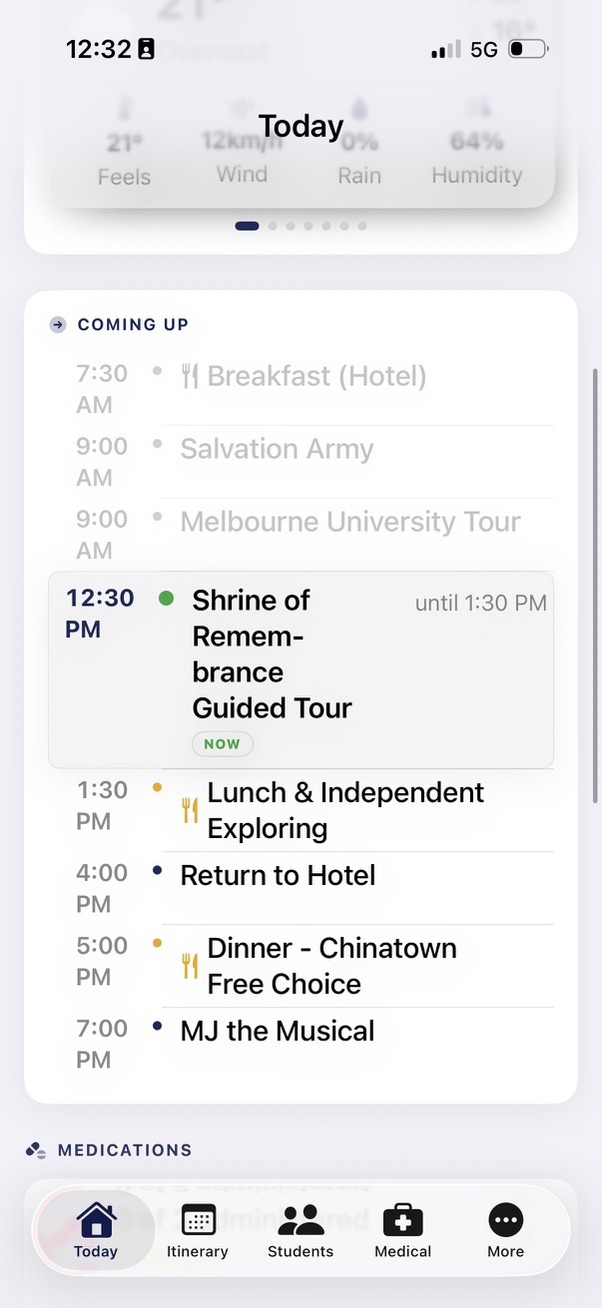
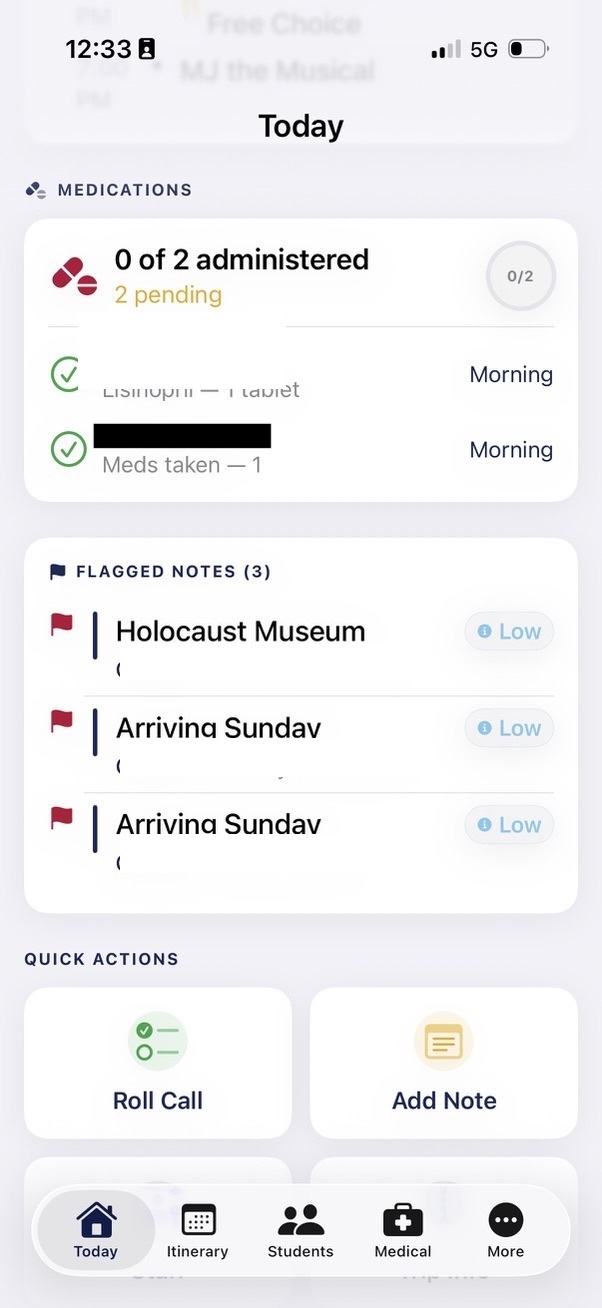
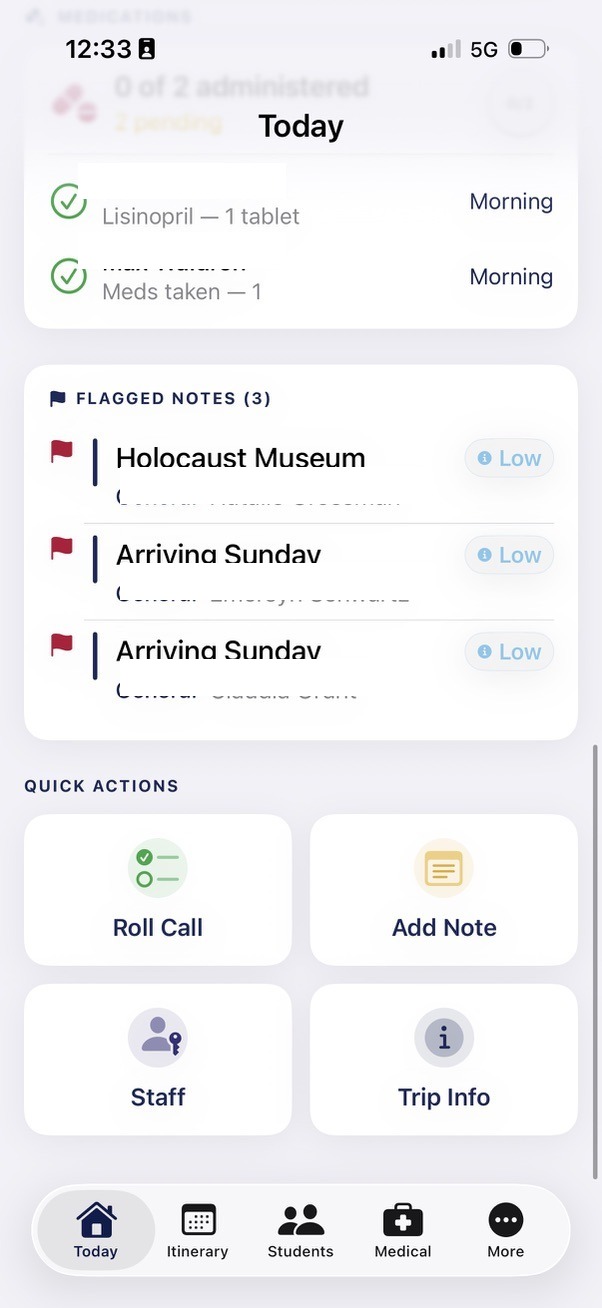
Melbourne Connections: Explore Zones
The second component of Melbourne Connections addresses one of the most anxiety-inducing aspects of taking regional students into a major city: free exploration time. Students need the freedom to explore, to make choices, to navigate independently. Staff need confidence that students understand their boundaries and can find their way back.
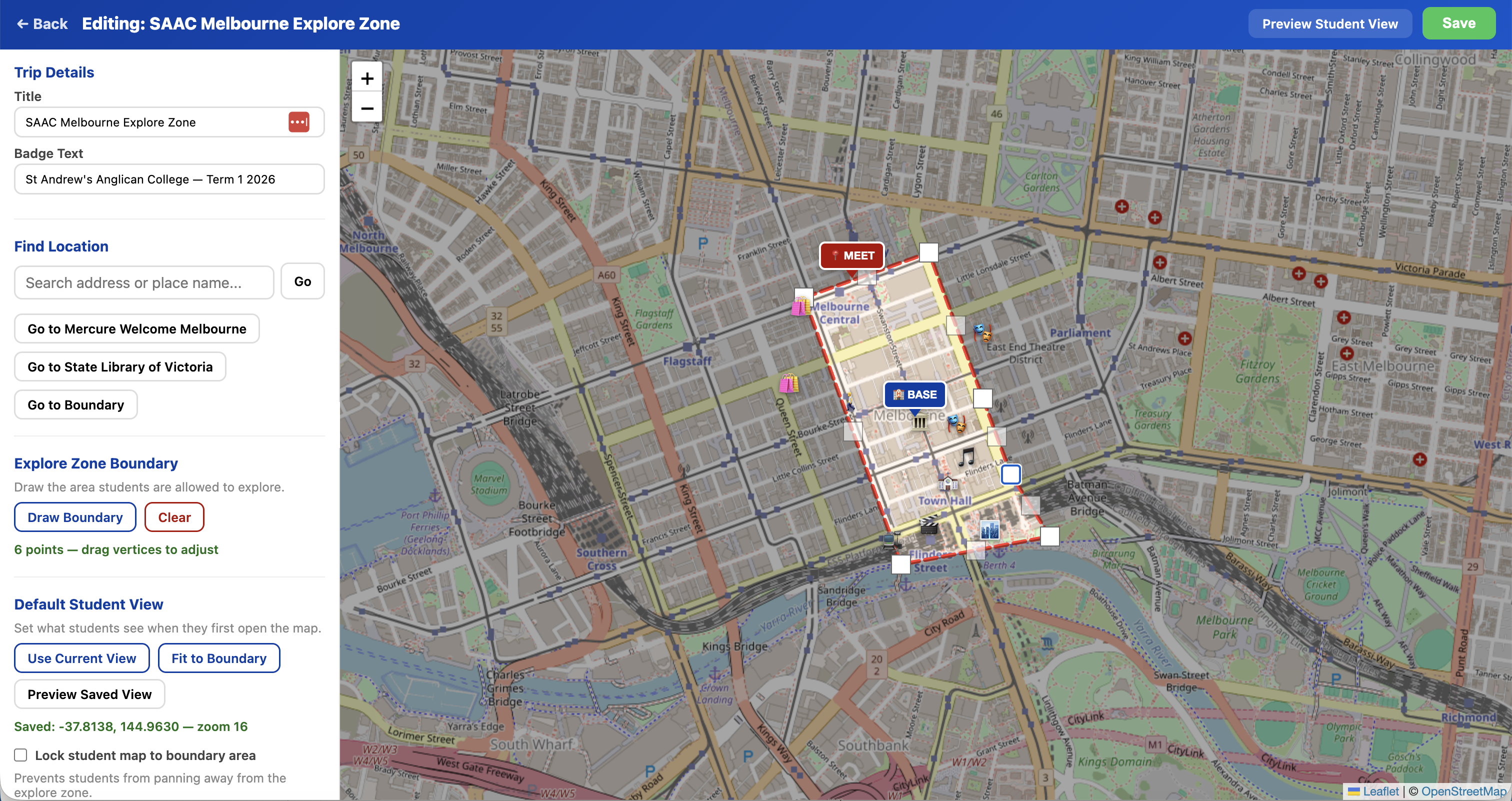
Explore Zones is a GPS boundary system I built that lets staff draw a polygon on a map defining the safe exploration area. Students access a live map on their phones showing their real-time position, the boundary, the hotel location, and a designated emergency meeting point. If a student drifts outside the zone, the interface immediately shifts to alert them. The status bar turns red. The message is unambiguous.
Staff configure landmarks within the zone so students can see points of interest. The visual theme matches the program's branding. QR codes provide instant student access. The system gives students genuine autonomy within clear, visible boundaries, and gives staff confidence that the technology is reinforcing the safety framework without requiring constant supervision.
The origin of Explore Zones illustrates the speed at which ideas can move from conversation to working prototype with AI. The feature was not planned before the trip. It was born during the trip itself, while I was demonstrating the existing tools to a colleague. As I walked through what the platform could do, the colleague suggested a GPS boundary feature for student free-time. I didn't have my laptop, but I had Claude on my iPhone. Standing in the city, I opened a voice conversation and described the idea aloud. Claude transcribed the conversation, thought through the technical approach, and generated a working prototype — an HTML file using open-source mapping libraries with GPS positioning and boundary detection — right there on my phone. That evening, back at the hotel with my MacBook, I refined the concept and deployed it as a full feature. From a spoken idea to a working tool in hours, conceived and prototyped without writing a single line of code by hand.
For students from a regional coastal town, this is transformative. They can walk the streets of Melbourne independently, make decisions about where to go, discover things on their own, and still have a digital safety net that keeps them oriented and within bounds. The technology doesn't replace the trust placed in students. It supports it.
Melbourne Icons: The Scavenger Hunt
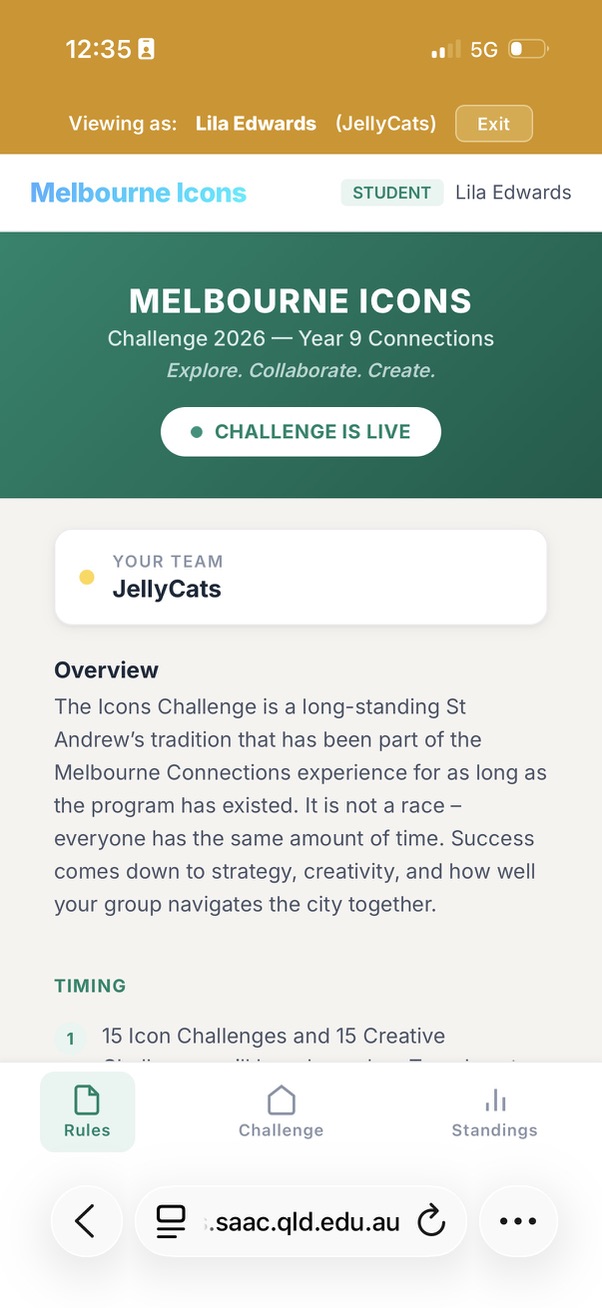
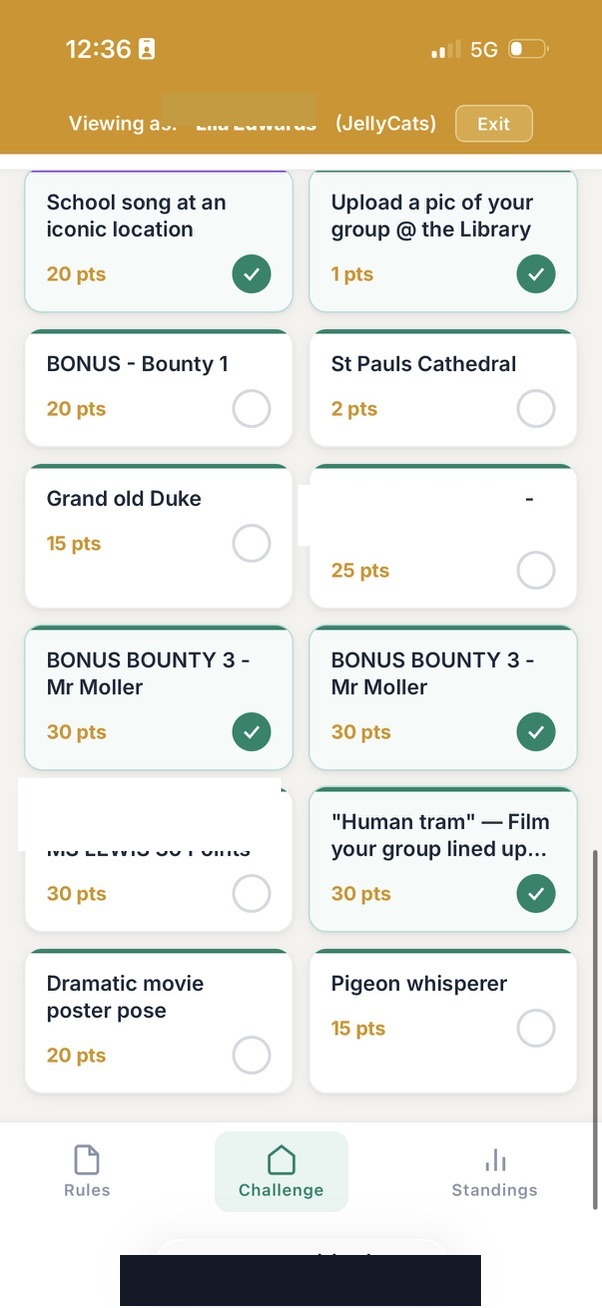
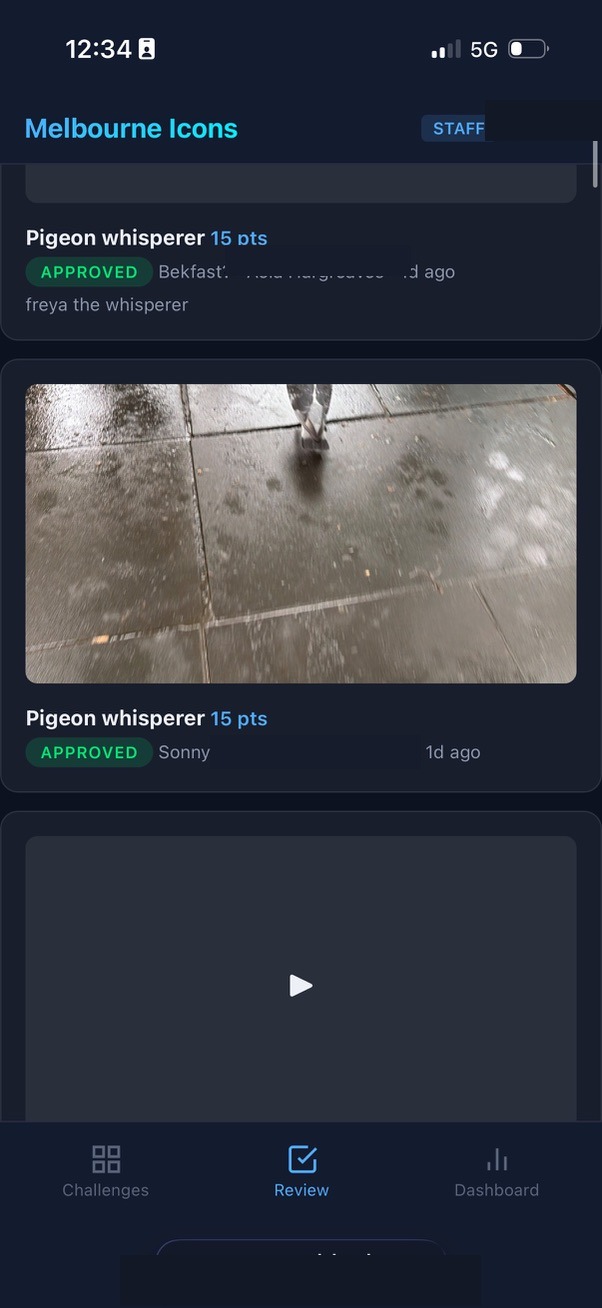
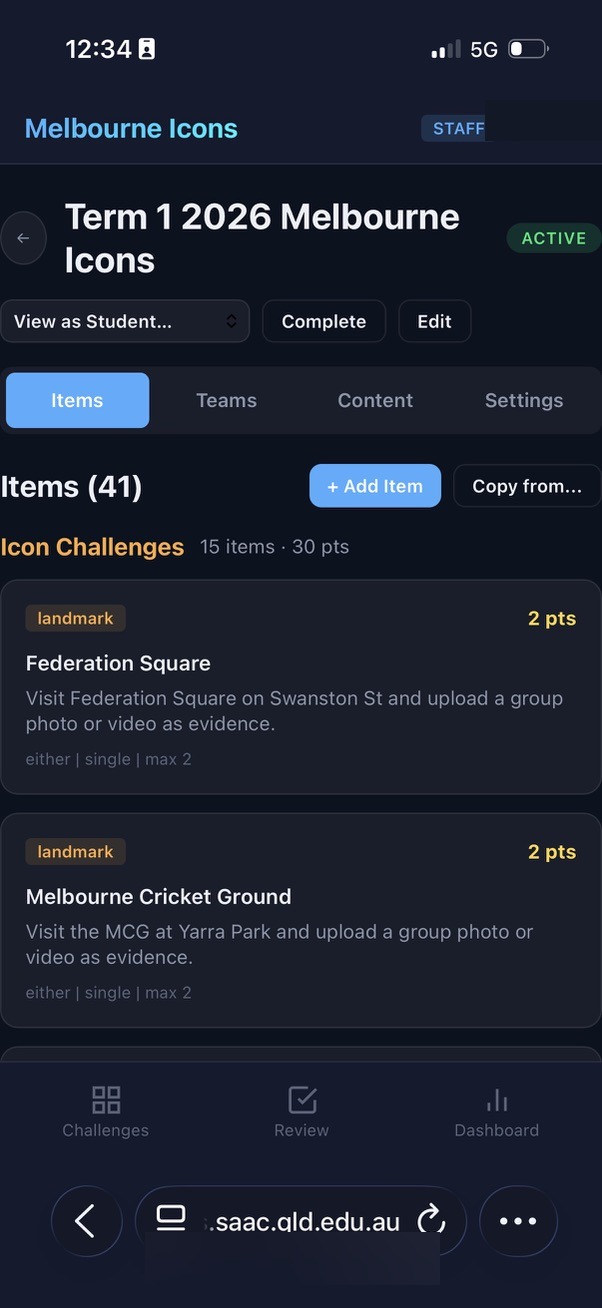
Melbourne Icons is a real-time team-based challenge platform. Seven teams competed across thirty-one items spanning landmarks, cultural challenges, and surprise bonus rounds. Students submitted photos and videos from the field. Staff reviewed and scored submissions in real time through a dedicated dashboard.
I designed the system to push students out of their comfort zones through creative challenge design. High-fiving a stranger. Singing a song at an iconic location. Asking a member of the public for directions while being filmed. Dancing to a busker. Finding a famous person for a photograph. These are not typical school activities. They require courage, humour, and the willingness to look a little foolish in pursuit of something meaningful.
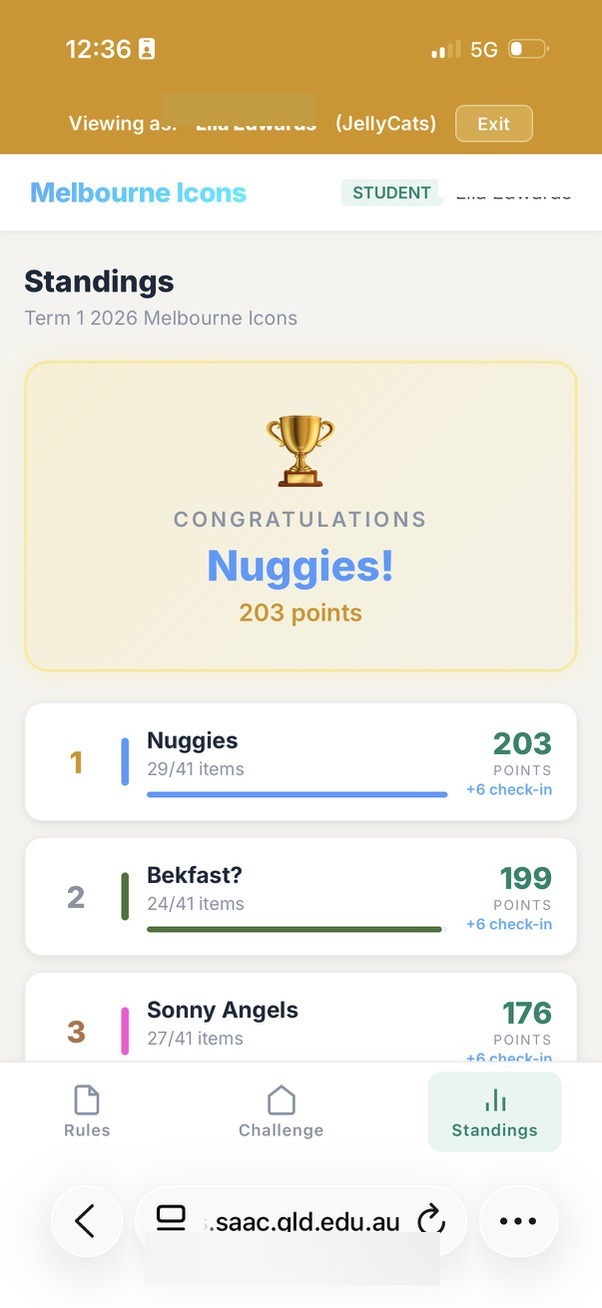
On the technical side, the platform features multi-judge scoring with configurable judge panels, live leaderboards, client-side image compression to handle mobile uploads on cellular networks, a leaderboard freeze-and-reveal mechanism for dramatic winner announcements, and a complete administrative interface for challenge design. Staff can add bonus challenges mid-event, creating spontaneous moments of excitement. A staff member can hide somewhere in the city, release a riddle as a bonus challenge, and award points to the first team that finds them.
On challenge day, the system processed eighty-three submissions from seven teams across a three-hour window. Zero downtime. Zero upload failures. Average review turnaround of 2.2 minutes. The architecture handled every request without stress, running on a single Node.js process with SQLite. The largest video uploaded was 6.58 megabytes. Combined, the seven teams walked an estimated nineteen kilometres through the city.
Students didn't think about any of this. They opened a link, chose a challenge, took a photo, and submitted it. The complexity was invisible. The experience was everything.
The Partnership: Human Intent, AI Capability
The development process was not what most people imagine when they hear "AI-generated code." There was no prompt that said "build me a trip management app." The process was iterative, conversational, and deeply grounded in my understanding of the problem domain.
A typical development session began with me describing a need rooted in lived experience. Not a technical specification, but a human problem: "When I walk into a restaurant with eighteen students, I need to show the chef every allergy and dietary requirement instantly." Or: "Staff need to see which multi-judge submissions they haven't scored yet, right at the top of the review screen." Or: "Students need to know immediately if they've wandered outside the safe zone."
The AI, working through Claude Code, would explore the existing codebase, understand the data model, propose an approach, and implement the changes. I would test, refine, redirect. The AI would adapt, learning the conventions of the project and building on previous decisions. Over time, the AI developed a deep familiarity with the architecture, the coding style, and the pedagogical intent behind every feature.
This is a fundamentally different relationship than either "the AI writes the code" or "the human writes the code with AI assistance." Ken Kahn, whose work at MIT's AI Laboratory alongside Papert and Minsky spans decades, describes this kind of AI as a "learner's apprentice" — not a tutor delivering answers, but an intellectual ally that amplifies what the human already knows. That framing captures exactly what I experienced. I understood the problem in the way only someone who has supervised teenagers in a foreign city can understand it. The AI understood software architecture, database design, and the mechanics of turning intent into functioning code. Neither understanding alone was sufficient. Together, we produced something neither of us could have built independently.
A key enabler of this partnership is the tooling itself. Claude Code runs directly inside the terminal, but its real power emerges when it operates within a professional development environment like Apple's Xcode. Xcode is the platform used to build native iOS applications — the same tool that professional developers use to create the apps on your phone. Traditionally, the learning curve is steep: Swift programming, interface design, build systems, device deployment. Claude Code collapses that curve dramatically. I describe what I need in conversational language — "add a screen that shows dietary requirements grouped by meal" — and the AI reads the existing project structure, understands the patterns already established, and writes the Swift code, the interface layout, and the data connections. I can see the changes appear in Xcode in real time, build the app, and test it on my phone within minutes. The conversation continues iteratively: I test, describe what needs adjusting, and the AI refines. The entire development cycle feels less like programming and more like a design conversation with a technically fluent colleague who happens to type very fast.
The partnership extended beyond writing code. I shared the program's risk assessment with the AI, discussing the specific concerns and challenges of taking regional students into a major city. The AI helped think through how technology could address those risks without diminishing the experience. It was a genuine dialogue about design, safety, and purpose.
During the live challenge day itself, the partnership continued in real time. When a staff member encountered an error while scoring submissions, I described the problem to the AI, which diagnosed the issue and implemented a fix within minutes. When I wanted to pause the leaderboard for a dramatic winner reveal, the feature was designed, built, deployed, and working within the same session. The AI wasn't writing code in isolation. It was responding to the lived reality of an event in progress, guided by me — someone who understood exactly what was needed and why.
After the challenge, the AI analysed the technical performance data from the day, examining submission rates, upload sizes, review turnaround times, and system load patterns. But more than producing a technical report, it helped me understand what that data meant for the quality of the learning experience. A 2.2-minute average review turnaround meant students got feedback fast enough to stay motivated. Zero upload failures meant no student lost a moment of creative courage to a technical glitch. The gap analysis showed the system was available every second of the three-hour window, meaning the technology never interrupted the flow of the experience. Technical metrics became pedagogical insights.
Even this paper itself is a product of the partnership. The AI helped me move from conversational reflection to articulated ideas, drawing out the connections between lived experience and educational theory, structuring thoughts that had been forming across weeks of building and deploying into a coherent narrative. The process of writing became another form of construction: building meaning from experience with the help of a capable partner.
The Constructionist Tradition
What happened in this project sits within a tradition that stretches back more than four decades. Seymour Papert, working at MIT's Artificial Intelligence Laboratory alongside Marvin Minsky, articulated a vision of computing in education that was radical in the 1980s and remains radical today:
"The child programs the computer and, in doing so, both acquires a sense of mastery over a piece of the most modern and powerful technology and establishes an intimate contact with some of the deepest ideas from science, from mathematics, and from the art of intellectual model building." — Seymour Papert, Mindstorms
Papert's constructionism, the idea that people learn most powerfully when they are building personally meaningful artifacts, was never just about children. It was about the relationship between the builder, the tool, and the knowledge that emerges through the act of construction. The same principle applies when an educator builds software to serve their students. The act of building forces a depth of engagement with the problem that no amount of vendor evaluation or requirements specification can match.
When I designed the scoring system for Melbourne Icons, I wasn't configuring someone else's software. I was making decisions about how judging should work based on my knowledge of the staff who would be scoring, the time pressures of a live event, and the goals of the challenge. When I realised mid-event that the "required judges" model was too rigid, because some judges wouldn't reach every submission, I could immediately redesign it to an "up to five judges, average as you go" model. The change was implemented and deployed within the hour. This responsiveness is only possible when the person who understands the educational context is the same person shaping the technical solution.
As early as 1977, Kahn identified three ways AI and education interact: students using AI tools in their projects, students creating artefacts by interacting with AI, and using computational models of thinking to design learning itself. The Melbourne project touched all three. I used AI tools to build software. I created artefacts — functioning applications — through interaction with AI. And the process itself forced me to think computationally about learning design: how students navigate a city, how staff manage risk, how a challenge sustains engagement over three hours. Mitchel Resnick's "Four P's" framework — projects, passion, peers, and play — offers another lens. The scavenger hunt was a project driven by passion, experienced with peers, in a spirit of play. But so was the act of building it. I was learning through making, just as Papert always argued we should.
AI-assisted development positions the educator at the intersection of deep domain knowledge and technical capability, providing access to the craft of software construction without requiring years of formal training in computer science. I bring the "what" and the "why." The AI provides the "how."
Risk, Safety, and Pushing the Boundaries of Experience
David Loader, the pioneering Australian principal who created the world's first one-to-one laptop program at Methodist Ladies' College in 1990, understood something essential about the relationship between risk and learning:
"To not risk is to not learn. Or to state this more positively; risk taking can make one open to learning and can ensure that this learning is retained." — David Loader, The Inner Principal
Taking thirty-five regional students into Melbourne involves real risk. Traffic, public transport, strangers, unfamiliar environments, students navigating independently for the first time in a city of five million people. Every year, the risk assessment grows longer. Every year, the duty of care expectations become more detailed. The danger is not that these requirements are wrong. They are essential. The danger is that without the right tools, managing the risk becomes so consuming that it crowds out the very experience the trip exists to provide.
This is where purpose-built software changes the equation. When every student's allergy information is one tap away, a restaurant meal becomes a manageable moment rather than a source of anxiety. When emergency contacts are accessible in seconds, not minutes, the margin of safety widens. When students carry a live GPS map showing their boundaries, the meeting point, and their own position, free exploration time becomes genuinely free rather than a source of constant worry for supervising staff.
The technology doesn't eliminate risk. It manages risk so efficiently that educators can focus on what matters: the learning. A staff member who isn't anxiously searching through printed lists for a student's medical information is a staff member who is present, attentive, and able to engage with the educational moment unfolding in front of them.
The AI played a direct role in this thinking. I shared the program's risk assessment and discussed the specific concerns of the trip. Together, we worked through how each feature could address a real safety need without constraining the experience. The GPS boundary system emerged from this dialogue. So did the offline-first architecture, because the moment you most need safety-critical information is often the moment your internet connection fails. So did the one-tap emergency contacts, because in a genuine emergency, every second of searching is a second too many.
Loader also wrote:
"Learning is not some technical task like computer programming; it is integral to the person. It is part of the spirit, the soul and the heart of a human being." — David Loader, Jousting for the New Generation
The software I built for Melbourne was technical, but the purpose it served was anything but. Every feature traced back to a human intent: help students be brave, help staff feel confident, create space for young people to surprise themselves. The technology was always in service of the spirit of the experience.
AI as the Educator's Apprentice
The model of human-AI collaboration demonstrated in this project aligns with an emerging understanding of AI's role in education, one that resists both the utopian narrative of AI as an all-knowing tutor and the dystopian narrative of AI as a threat to human agency. Kahn's framing of AI as the learner's apprentice — a co-thinker, pair coder, brainstorming buddy, and intellectual ally that amplifies human potential rather than replacing it — describes exactly what happened in this project. The AI was never in charge. It was capable, fast, and tireless, but it waited for direction. The intent, the judgement, and the accountability were always mine.
In the constructionist tradition established by Papert and extended by Kahn, Resnick, Stager, and others, the most powerful educational technology is not the one that delivers content most efficiently but the one that enables the learner to build something meaningful. When that principle is applied to educators themselves, a profound shift occurs: the teacher is no longer a consumer of educational technology but a creator of it.
This shift matters because educators possess a form of knowledge that no technology company can replicate. I know my students. I know the specific anxieties of a Year 9 student being asked to approach a stranger in a foreign city. I know which staff member will be meticulous about scoring and which will need a streamlined interface. I know that the moment of revealing the winner needs to be theatrical, not transactional. I know that students from a regional coastal town experience Melbourne differently than students from Sydney or Brisbane. This contextual, embodied, relational knowledge is precisely what makes educator-built software qualitatively different from generic platforms.
Minsky argued that intelligence itself is not a singular mechanism but emerges from the interaction of many diverse agents, each contributing a different form of understanding:
"What magical trick makes us intelligent? The trick is that there is no trick. The power of intelligence stems from our vast diversity, not from any single, perfect principle." — Marvin Minsky, The Society of Mind
The partnership between an educator and an AI embodies this principle. I contribute pedagogical knowledge, relational understanding, institutional context, and creative vision. The AI contributes technical fluency, architectural patterns, rapid implementation, and the ability to hold a complex codebase in working memory. What emerges from the collaboration is greater than either party could produce alone.
What the Students Actually Experienced
On 2 March 2026, seven teams dispersed from the State Library of Victoria into the streets of Melbourne. Over the next three hours, every single team completed the challenge of high-fiving a stranger. Seven groups of fifteen-year-olds approached members of the public, introduced themselves, and slapped palms. They sang songs at iconic locations. They asked strangers for directions while being filmed. They danced to buskers. They tracked down famous people and asked for photographs. One team walked all the way to the MCG, a five-kilometre round trip, to film their team song. Another team earned a perfect score for singing a nursery rhyme while skipping along the Yarra River.
The team that completed the most challenges, fourteen out of thirty-one, maintained a submission rate of thirty-one per hour, uploading a new photo or video every two minutes for thirty-three straight minutes. The team with the highest quality scores averaged 93% across all judged submissions, with four perfect scores. Combined, the seven teams walked an estimated nineteen kilometres through the city.
None of this required the students to think about technology. They opened a link on their phones, chose a challenge, took a photo or video, and submitted it. The technology was invisible. The experience was everything.
Melbourne Icons was competitive, creative, physical, social, and occasionally terrifying. It asked students to do real things in a real city with real people. The technology simply made it possible to orchestrate, track, judge, and celebrate those real things at scale.
But the scavenger hunt was only the visible peak. Underneath it, Melbourne Connections was quietly doing its work throughout the entire week. Every restaurant meal went smoothly because dietary information was instantly accessible. Every free exploration session was supported by GPS boundaries and meeting points. Every roll call was logged, every venue navigated, every emergency contact one tap away. The students experienced a trip that felt free and adventurous. The staff experienced a trip that felt manageable and well-supported. Both perceptions were accurate, and both were enabled by the same underlying technology.
What Happens Next: The Collaborative Horizon
As I write this, the Melbourne trip is being experienced again, this time with three incredible colleagues. And something is happening that was not fully anticipated.
The colleagues are curious. They are using the tools, and they are seeing possibilities. They notice things that weren't apparent before. They have insights born from their own expertise and their own relationships with students. One suggests a refinement to how roll calls work. Another sees an opportunity to use the platform for student reflection, giving students a way to easily record and capture their thoughts in the moment, not as homework days later but as a living response to what they are experiencing. A third identifies a workflow improvement in the review process that would have taken weeks to discover on my own.
The technical platform makes these refinements straightforward. What once required a software development cycle now requires a conversation. An educator describes what they need, and within hours, the tool evolves to match their insight. The system improves not because of a product roadmap designed by people who have never supervised a school trip, but because the people who live the experience every day are shaping the solution.
This points toward something genuinely significant. Imagine if the diverse insight and expertise of a broad range of professional educators could flow directly into the tools they use. Not through feature requests submitted to a vendor. Not through workarounds and compromises. Directly. Teachers, counsellors, outdoor education specialists, learning support staff, each contributing their unique understanding to software that serves their students.
"The scandal of education is that every time you teach something, you deprive a student of the pleasure and benefit of discovery." — Seymour Papert
The same principle applies to the tools educators use. Every time a vendor decides how a feature should work, they deprive an educator of the insight that comes from designing it themselves. When educators build, they discover. They discover what matters, what works, and what their students actually need. That discovery is valuable. It is, in Papert's sense, a form of learning.
What does education look like when the people who live it build the solutions? It is possible now. Not as a distant aspiration, but as a practical reality. An educator with domain expertise, an AI development partner, and the willingness to build can create tools that are more responsive, more contextual, and more aligned with the purpose of education than anything available on the market. And when that capability is distributed across a team of educators, each contributing their own professional knowledge, the potential is extraordinary.
Implications
Educators as domain experts deserve builder tools. Teachers possess deep, contextual knowledge of their students, their programs, and their institutional cultures. When AI lowers the technical barrier to software creation, this knowledge can be expressed directly in the tools that shape student experiences. The result is software that fits like a bespoke suit rather than an off-the-rack uniform.
The process of building is itself valuable. Papert's constructionism applies to educators as much as to students. The act of building the Melbourne trip platform forced a depth of thinking about challenge design, user experience, staff workflow, and pedagogical intent that would not have occurred through merely configuring an existing product. I understand the system intimately because I made every decision that shaped it.
AI partnership is not automation. At no point in this project did the AI make pedagogical decisions. It did not choose which challenges to include, how scoring should work, or what the student experience should feel like. It implemented, suggested, debugged, and refined. I remained the designer, the decision-maker, and the person accountable for the outcome. This is a partnership model, not a replacement model.
Safety and experience are not opposites. Purpose-built software can manage risk so efficiently that it creates more space for learning, not less. When safety information is instant, when boundaries are visible, when communication is one tap away, educators can push the boundaries of what they offer students because they have genuine confidence in their ability to manage whatever arises.
Real-time adaptability changes what is possible. The ability to modify software during a live event, adding features, fixing issues, adapting to unexpected needs, represents a qualitative shift in what educator-built tools can achieve. When I conceived, designed, and deployed the leaderboard freeze feature within minutes, the boundary between software development and responsive teaching effectively dissolved.
None of this happens without the right IT team. The educator-as-builder model only reaches production when there is an IT team willing to deploy, secure, and maintain the infrastructure behind it. They are the roadies who make the rockstars possible. I am fortunate to lead an IT team who share this vision for learning and are proud to put their technical expertise in the service of students and educators. The final hurdle of any project like this is not writing the code — it is deploying it into a school's production environment with enterprise-grade authentication, access control, and audit logging. That requires an IT team who understand not just the technology, but the philosophy of what school IT exists to serve.
Conclusion
Loader wrote in The Inner Principal about the constraints we impose on ourselves as educators, the things we assume we cannot do, the boundaries we accept without questioning. For decades, custom software has been on the other side of that boundary for most teachers. You could use technology. You could integrate technology. You could even advocate for technology. But building it? That was for other people.
AI-assisted development tools like Claude Code are dissolving that boundary. Not by making software development trivial, because it isn't, but by making it accessible to people whose primary expertise lies elsewhere. An educator who understands their students, their program, and their context can now translate that understanding directly into functioning software, working in partnership with an AI that handles the technical craft.
"We imagine a school in which students and teachers excitedly and joyfully stretch themselves to their limits in pursuit of projects built on their own visions." — Seymour Papert
On a warm March afternoon in Melbourne, thirty-five teenagers stretched themselves to their limits: singing in public, high-fiving strangers, sprinting across a city they had never navigated alone. Behind the scenes, I had stretched myself too, working with an AI to build the infrastructure that made the experience possible. Both acts of stretching mattered. Both produced learning that will last longer than any individual lesson.
The Melbourne program was not a technology project. It was a human project, enabled by technology.